
Beyond Automations: How Assista is Evolving to Support Your Entire Team in 2026
Assista is growing up. We’ve redesigned our platform for 2026 to help companies cut through the digital noise. Learn how our new Spaces, Insights, and Agents features can help you and your team stay focused on the work that actually matters.
2025 was a defining year for Assista. We grew from a few hundred users to over 31,000 by the end of December. It was a journey of constant iterations, listening to your feedback, and spending countless hours looking at the data to see what actually helps you work better.
We redesigned the platform, added new features, removed what didn't work, and started over when we had to. By the end of the year, we were helping professionals all over the world run tens of thousands of automated workflows.
As we move into 2026, we want to go a step further and redefine what Assista can do for you. Our goal is to transform Assista from a tool where you build automations into a platform that helps you perform at your best every single day, not just as an individual, but as an entire organization.
Here is a look at what we’ve built for you.
Spaces: Your Team’s Knowledge Base
In any company, work is divided into departments like sales, marketing, accounting, or operations. To keep everything organized, we introduced Spaces. This is your dedicated knowledge base where you can add key documents by category so the AI can analyze them and use that context for your daily tasks.
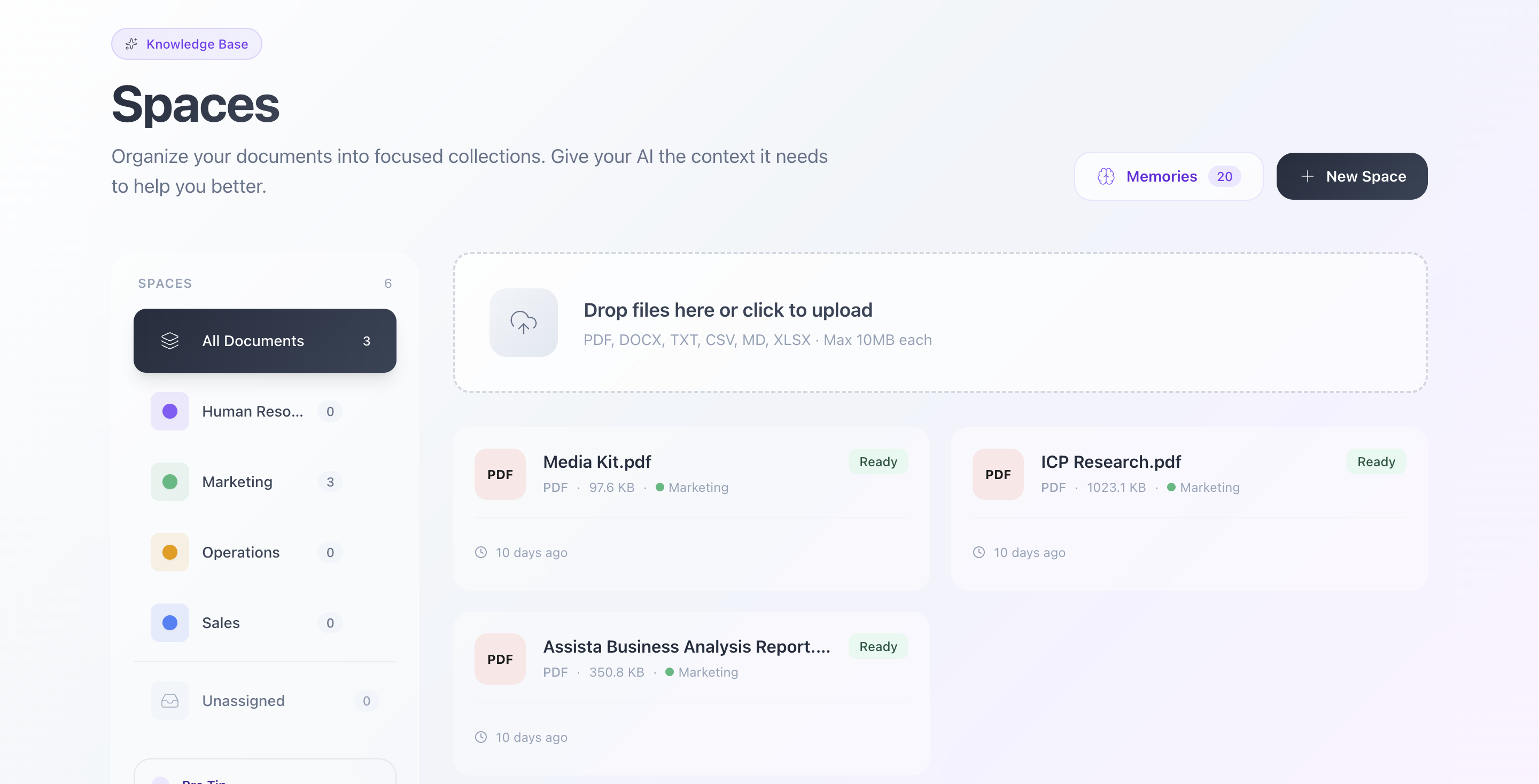
Spaces view in Assista AI
- Do you have a media kit for your brand? Create a Space called "Marketing" and upload it.
- Do you have a specific way you talk to your Ideal Customer Profile? Add that document too.
You can create as many Spaces as you need to keep your information structured. These serve as the foundation when you are writing in the chat or defining a new Agent.
Agents: Your New Digital Colleagues
Agents act like members of your team. You give them a name, a description, and a clear set of instructions. You choose which documentation they should use and which tools they have access to. From there, they execute tasks whenever you need them.
For example, you can create a "Marketing Assistant." As a manager, you can decide exactly who in your organization has access to which Agent.

Agents view in Assista AI
How to set one up
Creating a new Agent only takes a few minutes. You click "New Agent," give it a name, and select the team or department it belongs to. While the "Quick Description" helps users understand the Agent's role, the real power lies in the Instructions and Special Rules to Follow.
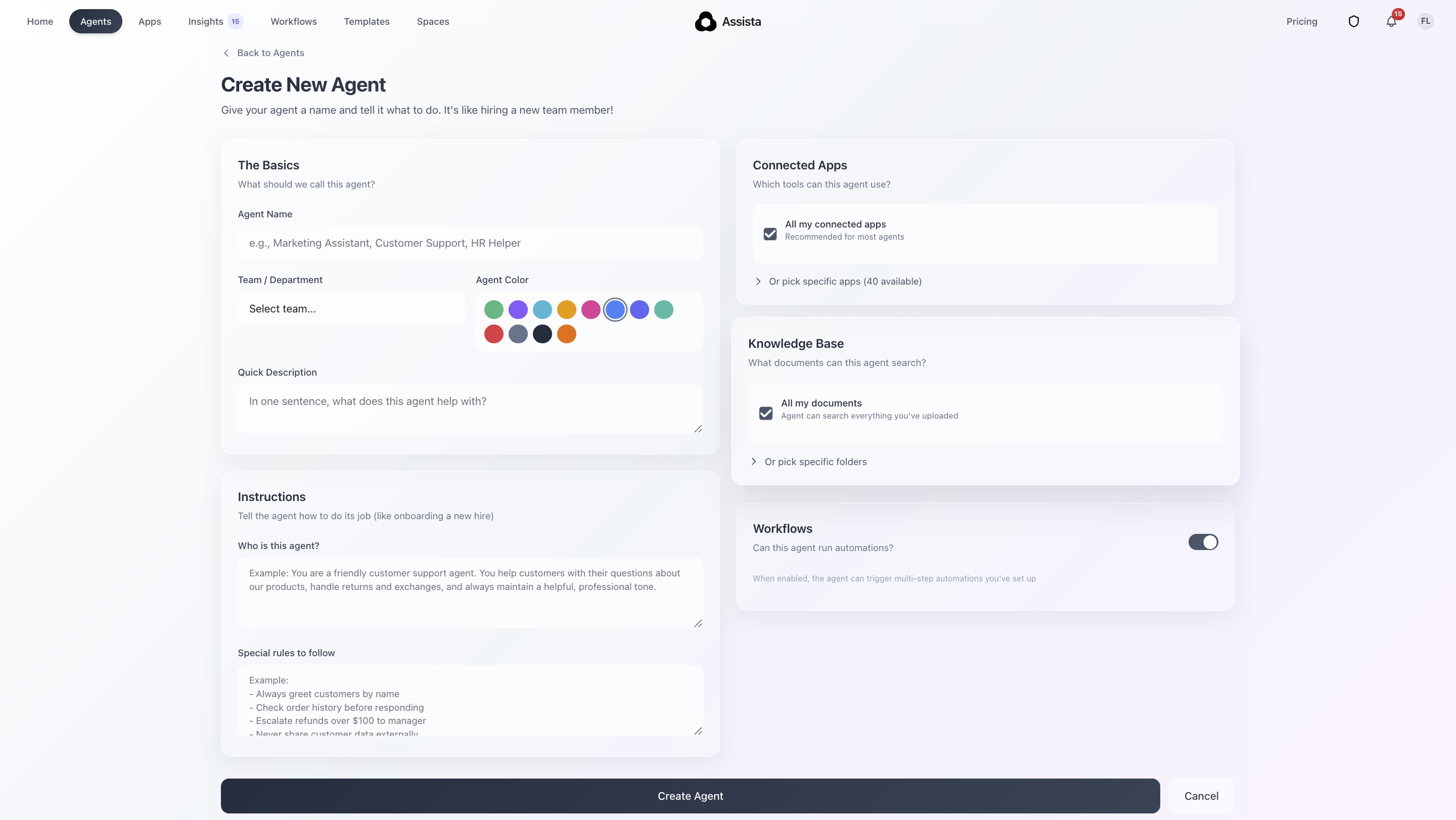
Agent creation screen
Think of these fields as the "brief" you would give a new hire. The more specific you are about how the Agent should act and what the ground rules are, the more reliable it becomes. This clarity keeps the AI focused on your actual goals and prevents it from making mistakes or "guessing," so the results always match your standards.
On the right side of the setup screen, you’ll find your Apps and Knowledge Base. You can pick exactly which tools and documents the Agent can access. As a bonus, if you have an SOP (Standard Operating Procedure) or a document for a specific process you want to automate, you can import it directly, and the Agent will act according to those rules.

Adding SOPs to your Agent
Interaction and Approvals
To use an Agent, you just go to the homepage and use the "@" symbol in the chat to mention the Agent you need. Type your request, and it will perform according to its configuration.
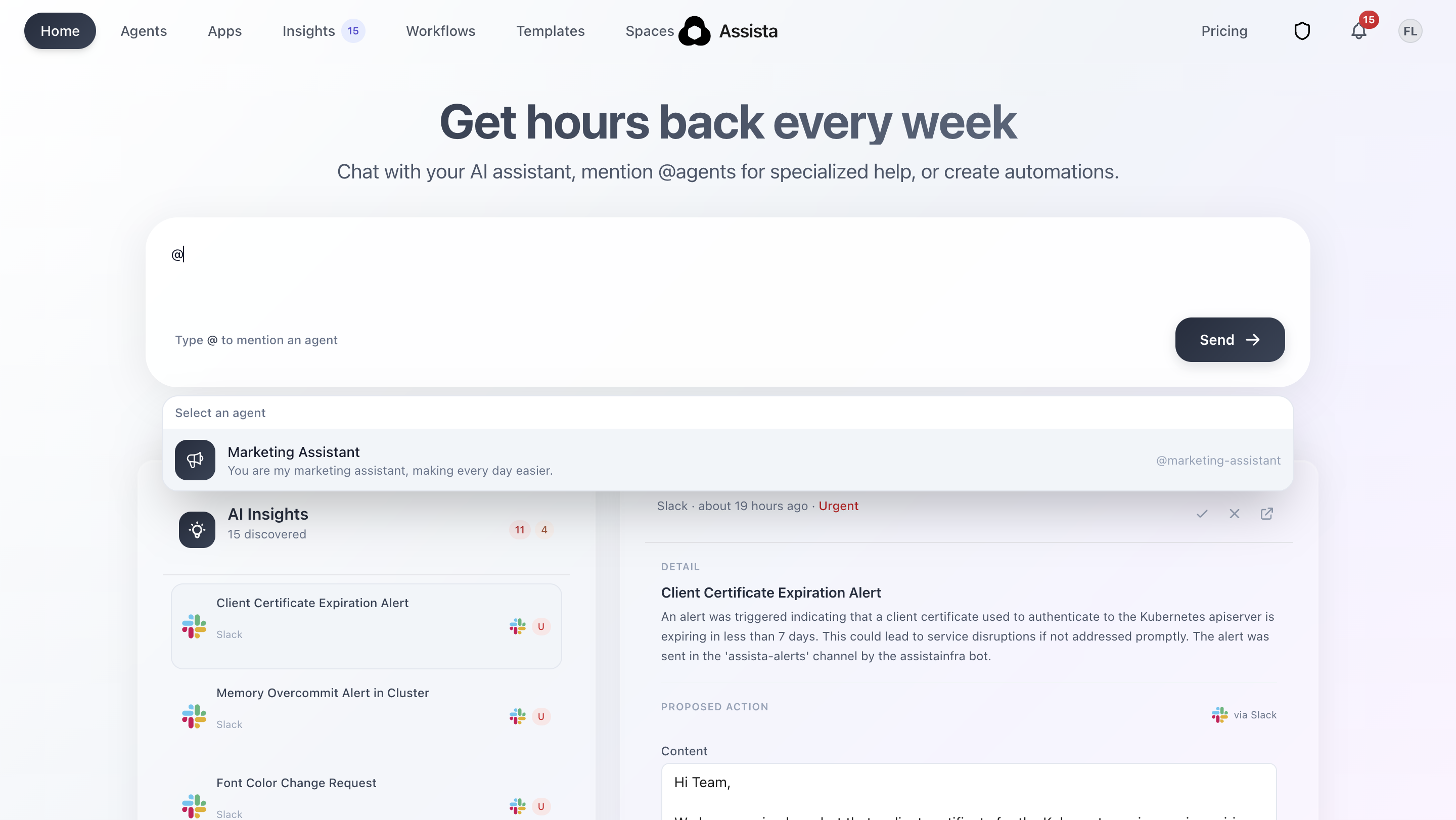
How to call an Agent in your chat
You stay in control through the Recent Activity section at the bottom of the Agents screen. When an Agent generates a task, it appears there first. You can review the drafts, approve them one by one, and ensure everything is correct before anything is finalized.

Assista performing like a Marketing Assistant
Insights: Cutting Through the Noise
Insights is the feature I am personally most excited about. We all lose too much time trying to stay up to date with internal messages, emails, and notifications.
Insights solves this by running periodically across all your connected apps. It identifies things that need your attention, like a reply to a colleague or a project update. It then gathers these in a dedicated dashboard and prepares draft actions for you.

Insights section allows users quickly process urgent tasks
Instead of jumping between tabs, you just check the drafts, modify them if needed, and click "Run Action." You can clear your morning "to-do" list in minutes. If you need an update in the middle of the day, just hit "Scan Now" in the Insights page for an instant list of things that require your intervention.

AI Insights feature allows users quickly scan for new tasks
What is Staying the Same?
Our core Workflows were a huge success last year, and they remain a central part of Assista. You still have a dedicated page to manage all your active and inactive workflows.

Workflows page shows your active and inactive automations
However, based on your feedback, we made a major update: you can now create workflows directly from the chat box on the homepage. If you ask for something that sounds like a repetitive process rather than a one-time task, Assista will automatically create a workflow for you.
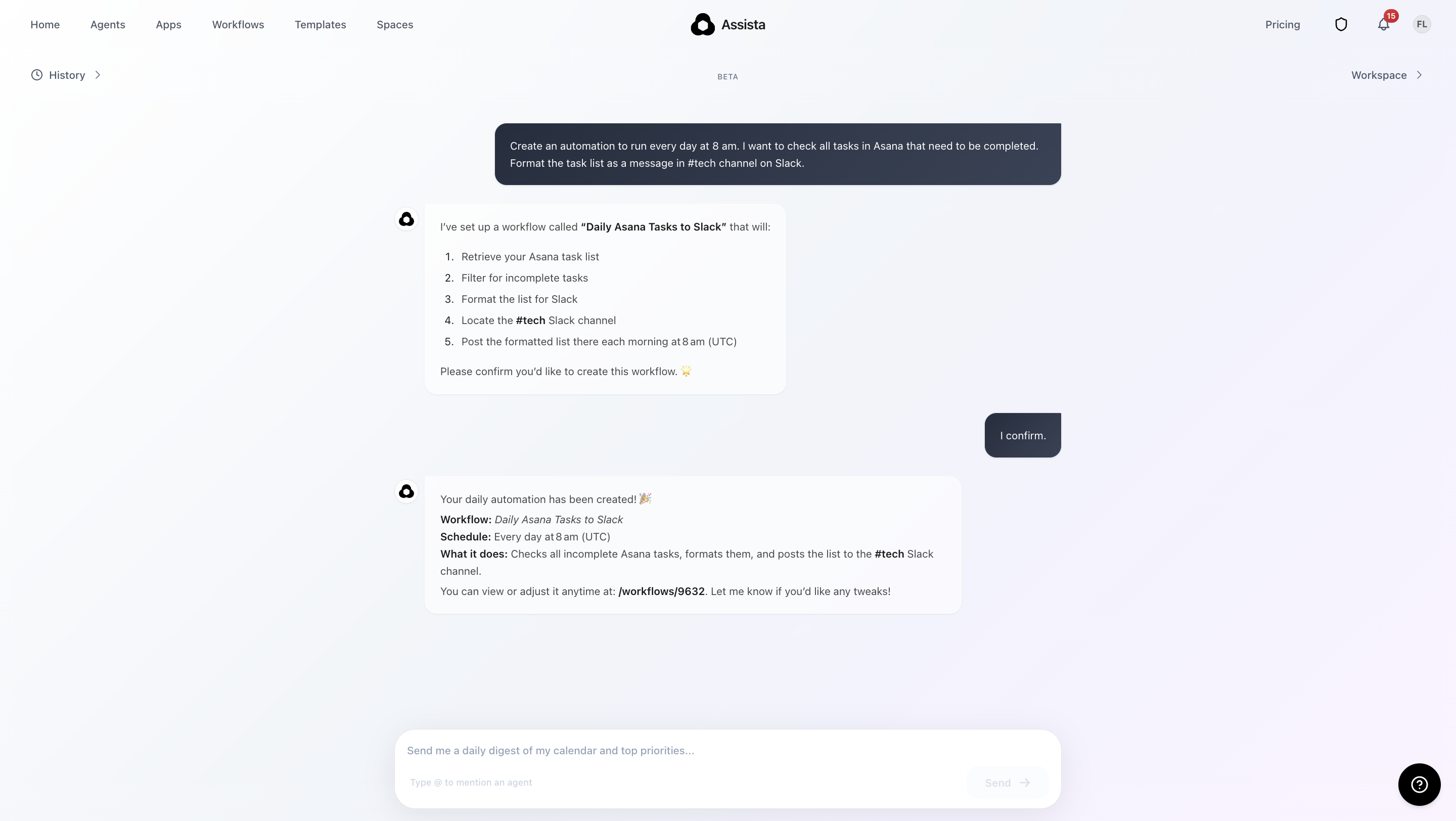
Creating Workflows directly from your chat
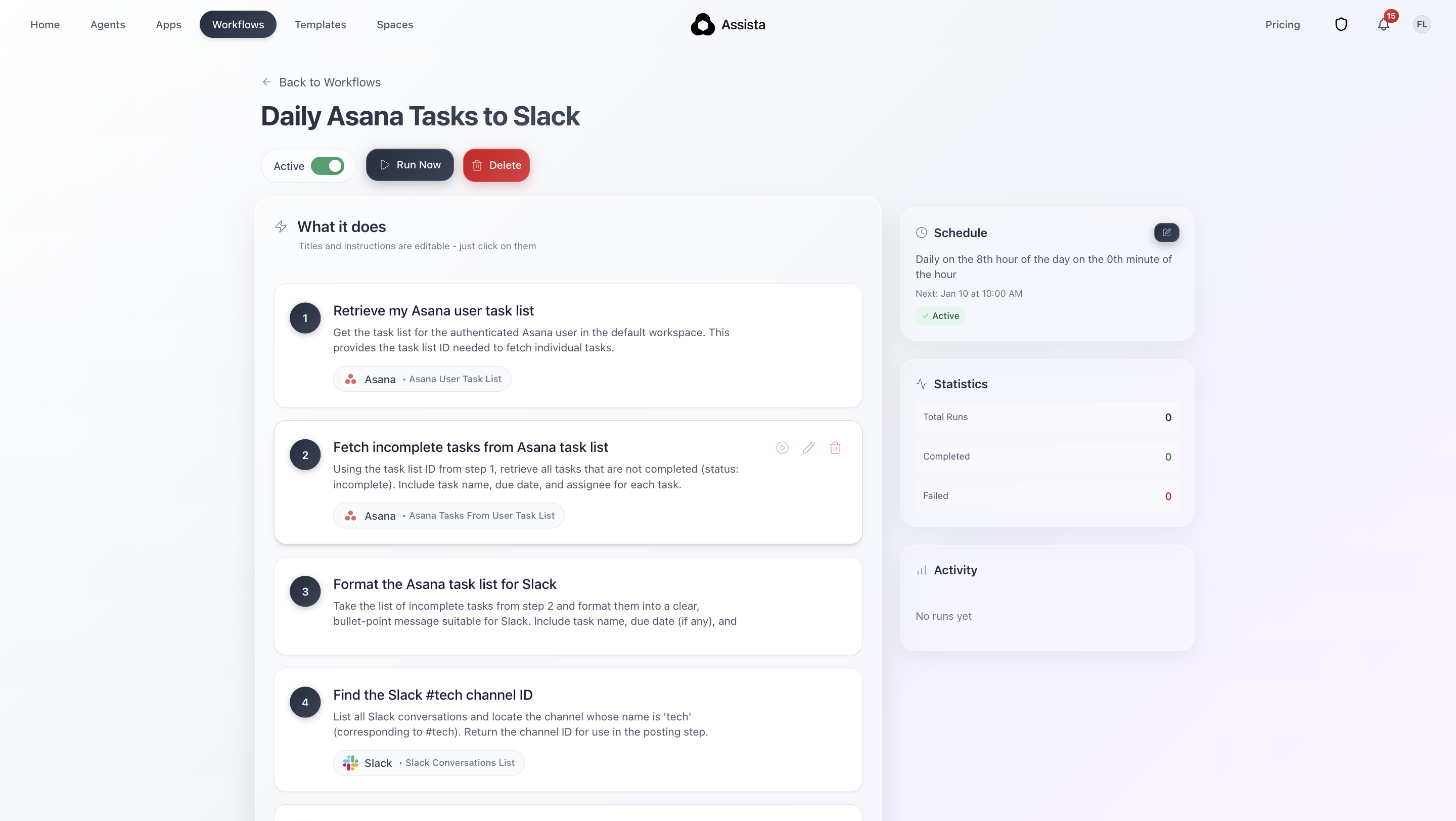
From chat directly to created Workflow
Our Templates page also continues to grow. The layout is the same, but we add new templates every week. You can import them, run them, or customize them to fit your specific needs.

Workflow Templates
Finally, we are constantly adding new Apps. Assista is designed to be your companion, working inside the tools you already use every day, and we are working hard to make sure every tool in your stack is supported.

Apps, here are all Assista's integrations
2026 is about making work feel less like a mountain of notifications and more like a high-performance environment. We’re excited to see how your team uses these new tools to grow.
Final Thoughts
We didn’t build these new features just to add more buttons to your screen. We built them because we know exactly how it feels to be buried under a mountain of digital noise and repetitive tasks. Our goal for 2026 is to give you and your team the breathing room to focus on the work that actually moves the needle. Let Assista handles the background details. We are truly excited to have you with us on this journey and we can’t wait to see how these tools help you reach your best level of performance yet.