.png&w=3840&q=75)
Building an Organization Memory: How Spaces turn SOPs into Actionable Agents
Most SOPs are just digital paperweights. This post breaks down how to turn your static documentation into active AI agents that actually execute tasks, eliminating the need for constant pings and "how-to" meetings.
Most companies spend weeks documenting processes only for them to sit in a folder that no one ever opens. It is a common cycle. A new hire reads the SOPs during onboarding, nods, and then promptly forgets where they are saved.
When they actually need to perform a task, finding that specific document is a headache. Instead of looking for the official process, they do what is natural. They ask a colleague.
This is where the organization loses time. You lose the hours spent waiting for a Slack reply, and the answer provided is usually based on a shortcut that colleague invented recently. Your standard process is no longer standard. It becomes a collection of individual habits. At a scale of 20 to 150 employees, this makes everything slow and messy. It makes it harder to grow without hitting constant bottlenecks.
The Coordination Tax
When employees rely on each other for information instead of the established system, quality becomes inconsistent. The CEO thinks everyone is following the playbook, but the COO knows that everyone is winging it.
This creates a high cost of coordination. Senior staff and managers lose hours every week answering the same repetitive questions. This is time that should be spent on high-level strategy. Instead, it is wasted explaining the same procedure for the tenth time.
If your senior managers are acting as human search engines for your documentation, you have an operational problem. You are paying a high salary for someone to repeat information that should be accessible and actionable.
Why Traditional Knowledge Base Software Becomes a Graveyard
If you are looking for knowledge base software, you have likely considered tools like SharePoint, HubSpot Knowledge Base, or Splunkbase. These are standard for a reason. They offer a place to put things.
However, the problem is rarely the storage. The problem is the friction of retrieval. Most helpdesk or KB systems require the user to leave their work, open a new tab, search for a keyword, and hope the document they find is the most recent version.
To build a knowledge base you will actually use, you need to follow these principles:
- Zero Search Friction: The info must be where the conversation happens, like Slack or Email.
- Contextual Relevance: The system should only show the Marketing team the documents relevant to them, not the HR payroll manual.
- Active Execution: The documentation should do the work, not just describe it.
Turning Your Knowledge Base into an Actionable System
Instead of just building another library, you can use Assista as your active knowledge system. If your assets are already in SharePoint or Google Drive, you do not need to migrate them. You simply connect them.
We move beyond simple storage using two core concepts: Spaces and Agents.
1. Spaces: Organizing Knowledge by Department
A Space is a dedicated area for a specific department like Sales, Marketing, or Operations. Instead of digging through a company-wide drive, employees only have access to the documents relevant to their role.

By organizing information into Spaces, you ensure that the documentation finds the employee. The right information is mapped to the right department. This ensures the memory of the organization is available exactly where the work happens.
2. Agents: Turning Documents into Action
A document can only tell you what to do. It cannot do the work for you. This is why we created Agents. By connecting an Agent to a specific Space, you turn a passive document into an active colleague.
Instead of an employee waiting for a teammate to explain a brand voice or a technical requirement, they mention the @Agent in the chat. The Agent does not guess. It looks at the specific documents in that Space and executes the task based on your exact rules.
How to Build a Digital Colleague in Minutes
Creating an Agent is a process designed for the people running the business, not for developers. You do not need an IT ticket or a complex flow in a tool like n8n.
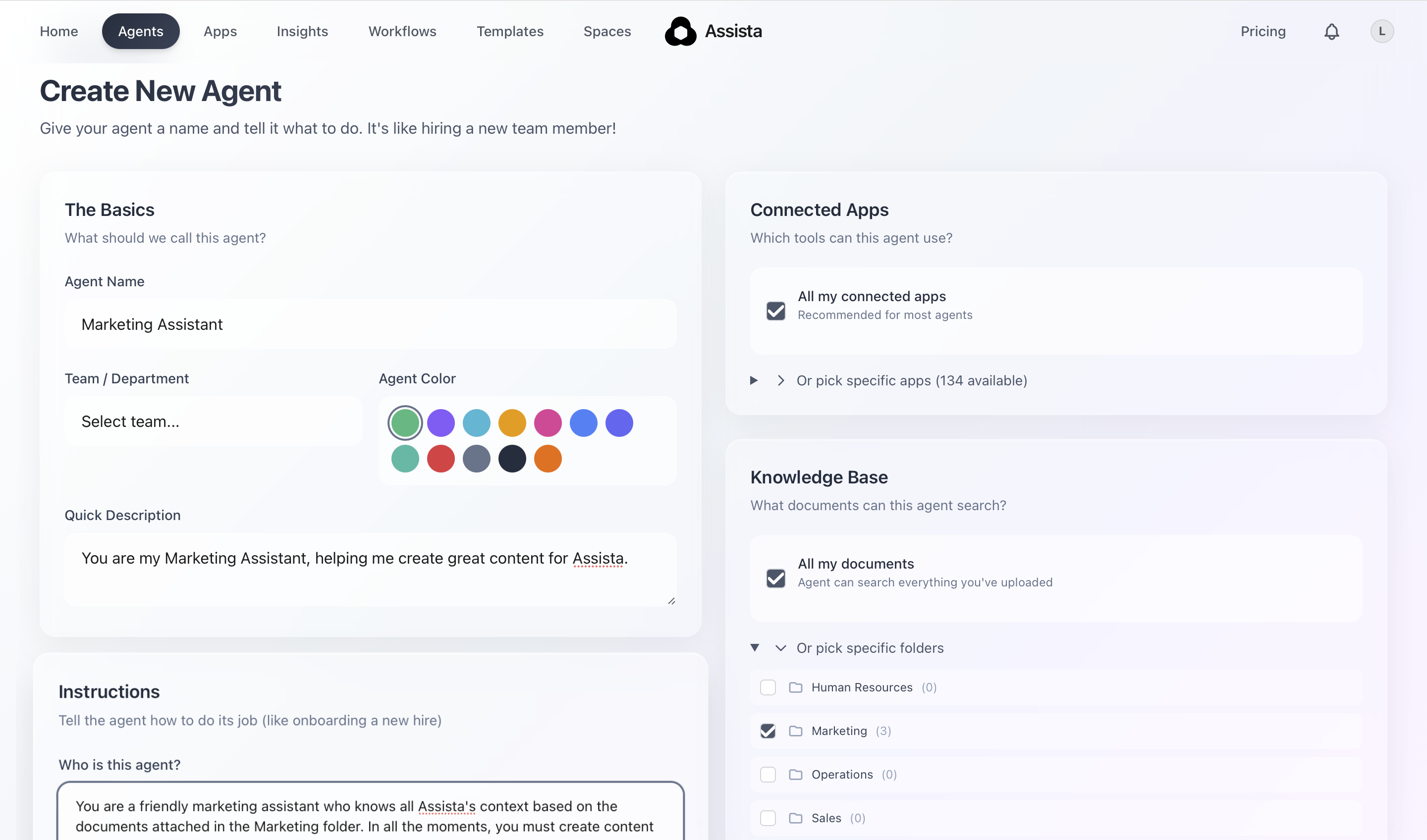
- Name and Purpose: Give the Agent a name and a description so the team knows what it does.
- Instructions: Write the brief. Explain how the Agent should act and what rules it must follow. It is as simple as explaining a task to a person.
- Connect the Brain: Select which Space the Agent has access to and which tools, like Notion or Slack, it can use.
If you want to empower your team, you can give specific managers permission to create their own Agents. This allows a Marketing Manager to build a Content Specialist without needing a technical team.
The Onboarding Bottleneck
Consider the first 30 days of a new hire. Usually, this period is a drain on the rest of the team. The new hire has questions, and the veterans have to stop their work to answer them.
When you have Agents connected to your department Spaces, the new hire has a mentor that is available 24/7. They can ask about the brand voice, the project naming conventions, or the client onboarding checklist. They get the official answer immediately.
The veterans keep their focus, and the new hire becomes productive in days instead of weeks.
The Iterative Loop of Performance
Processes should never be static. The best systems evolve based on what is happening on the ground. When your documentation is live and actionable through Agents, you can see where it needs improvement in real time.
If a process changes, you do not need to update a 50-page manual that nobody reads. You simply update the core document in the Space. The Agent immediately adapts to the new rules.
The goal for 2026 is to stop managing people’s memories. You should start managing a system that works as fast as your team thinks. If your current SOPs are just digital paperweights, it is time to turn that operational debt into an active asset.